
Persian TV in Australia, on a GLBOX
For over 15 years we've sold and supported GLWiZ boxes for Persian families across Australia. It's how a lot of our customers watch the news from home, follow their series and keep Farsi on in the background for the kids.
What you can watch
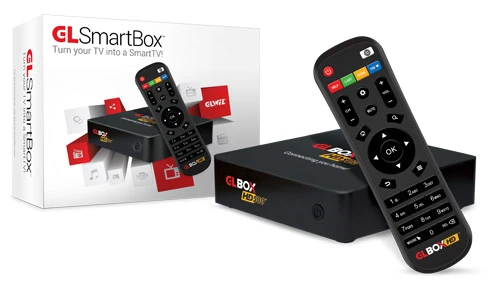
GLWiZ puts live Persian TV channels, Persian radio and an on-demand library of movies and series on one box. The GLBOX plugs into your TV and opens straight into GLWiZ, so there's no app to hunt for and no satellite dish on the roof.
GLWiZ carries Arabic, Turkish, Afghan and Kurdish programming too, which helps in a mixed household.
Persian channels on GLWiZ
These are some of the Persian channels GLWiZ lists, grouped the way GLWiZ groups them. Line-ups change from time to time, so if one channel matters to you, ask us before you buy.
Sport
Football is the reason a lot of our customers get a GLBOX. IRIB Varzesh is Iran's sports channel, and IRIB Channel 3 carries a lot of the big matches. The sports section also has Barnameh 90 and Persian League, and Varzesh is on the radio for when you're away from the TV.
- IRIB Varzesh
- IRIB Channel 3
- Barnameh 90
- Persian League
News
- BBC Persian
- VOA Farsi
- Iran International
- Shabake-e Khabar
- Iran Farda
Movies and series
- Ekran Movies
- Film 1
More live TV
- Pars TV
- ITN
- IRIB Channel 3
Radio
- Radio Farda
- Radio Javan
- Radio Payam
- Varzesh
- Radio Asheghaneh
- Radio GL
Why buy your GLBOX from us
- We've done this for over 15 years. Most problems you could run into, we've already fixed for someone else.
- You can call or WhatsApp us in Farsi or English.
- We set up your GLWiZ account before we post the box, and it travels with Australia Post tracking.
- We're an internet provider too. If the picture freezes, we can check the box and the connection in one call instead of you going back and forth between two companies.NETPAL nbn customers with a GLBOX get a discount.
Setting it up at home
- Plug the GLBOX into the TV with the HDMI cable.
- Connect it to the internet. A network cable from the modem is the most reliable; Wi-Fi works if the signal is strong where the TV is.
- Turn it on. Your account is already set up, so it goes straight to the channels.
If the TV is far from the modem and the Wi-Fi is weak there, tell us before you order. A mesh unit or a powerline adapter usually fixes it. Our Wi-Fi dead zones guide explains the options.
Questions people ask us
Can I watch Iranian TV in Australia?
Yes. GLWiZ streams Persian TV channels, radio and on-demand movies and series over the internet, so all you need is a GLBOX, a TV and a steady internet connection.
Can I watch Iranian football in Australia?
Yes. GLWiZ carries IRIB Varzesh, Iran's sports channel, and IRIB Channel 3, which shows a lot of the big football. There's also Barnameh 90 and Persian League in the sports section, and Varzesh on the radio.
Do I need a satellite dish?
No. Everything comes in over your internet connection. There is no dish to mount and nothing to point.
Can I talk to you in Farsi?
Yes. Call or WhatsApp us and speak Farsi or English, whichever is easier for you.
Is it easy enough for my parents to use?
We arrange GLWiZ activation when the box is posted, so at home it's two cables: HDMI to the TV and internet to the box. If they get stuck, they can call us and we'll talk them through it in Farsi.
What if the picture keeps freezing?
Call us. Most freezing comes from the home Wi-Fi, not GLWiZ. We check the box and the connection together, and we're often the ones who supply the internet as well, so one call covers both.