
The nbn box (NTD): what it is and what each light means
That black or white box on your wall is the nbn connection box, also called the NTD. Here's which connection types have one, what each light should look like, which cable goes where, and when to restart or call.
- 1
What is the nbn box?
The nbn box, officially the Network Termination Device (NTD) or nbn connection box, is the nbn-owned unit where the nbn network ends and your home begins. People also call it the nbn black box or the nbn outlet, though the actual outlet is the socket in the wall. Your Wi-Fi router plugs into the box with an ethernet cable and shares the connection around the house. The box belongs to nbn, so leave it behind when you move. It is set up for that address only. Your router has its own lights, covered in our modem guide.
Modem lights explained → - 2
Which connection types have one, and which don't?
FTTP, HFC, FTTC and Fixed Wireless each have an nbn box inside the house. On FTTC it's a small unit nbn calls the NCD. Satellite has a modem fed by the dish, which we treat as the box. FTTN and FTTB have no nbn box at all. Your modem plugs straight into the phone socket, so the modem's lights are the ones to read. If you aren't sure which type you have, our connection types guide will tell you.
Which nbn connection type do I have? → - 3
FTTP: Power, Optical, Alarm and Port
The fibre box has four lights. Power and Optical should be solid green, though Optical may flash slowly while data moves. Port is green and flickers as your router uses the connection. Alarm is the odd one: it should be off. Red Alarm means the box has a fault, and red Optical means it has lost the nbn network. Neither clears with a restart, so call your provider. Not seeing any lights? The box has a LIGHTS ON/OFF button, and a box with its lights switched off looks dead.
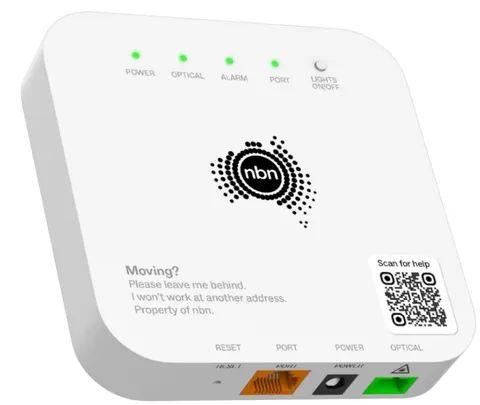
The nbn connection box looks like this FTTP explained →What a healthy nbn connection box looks like - 4
HFC: the box on the cable outlet
The HFC box has four lights down the front: Power, Downstream, Upstream and Online. All four should be solid green once it's up. When you first switch it on, give it up to 30 minutes to settle. Downstream and Upstream flashing can also mean a firmware update, which takes up to 10 minutes. Flashing Power means a fault with the box. Your router plugs into the ethernet port, and the cable from the wall goes into the box's own cable port.
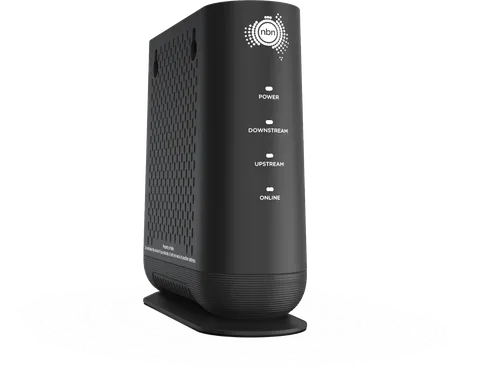
The nbn connection box (HFC) looks like this The HFC box and wall socket in detail →What a healthy nbn connection box (hfc) looks like - 5
FTTC: the small NCD
The NCD sits near a phone socket and has four lights: Power, Connection, DSL (nbn calls it Broadband) and LAN. They're all blue when things are healthy. The Connection light shows the box is powering the nbn equipment in your street, so it needs a good phone cable to the wall. After a restart, Connection and DSL can take up to 20 minutes to go solid. Don't restart it again in that window. Two cables matter: phone cable from the wall to the NCD, then ethernet from the NCD to your router.
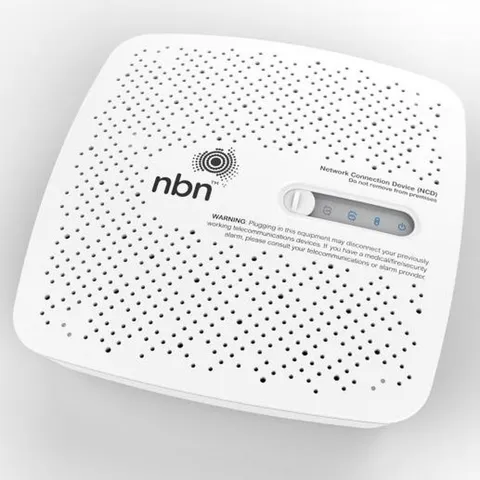
The nbn connection device (NCD) looks like this FTTC explained →What a healthy nbn connection device (ncd) looks like - 6
Fixed Wireless and satellite
A Fixed Wireless box takes a cable from the roof antenna. Healthy is Power solid green, Status green and ODU green (the antenna link). Some boxes also have a Signal light, which should be green. Amber or red Signal in clear weather means weak reception. A red ODU usually needs a technician. Satellite is simpler: a power light and a status ring, solid blue when online. Satellite takes 6 to 8 minutes to reconnect after a restart, and heavy rain can drop it briefly. Never adjust the dish yourself.
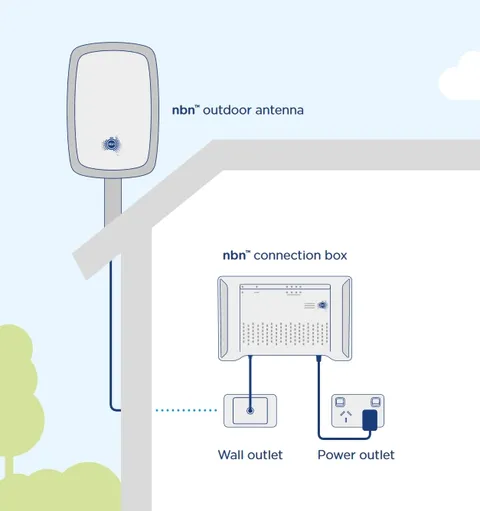
The nbn connection box (indoor unit) looks like this Fixed Wireless explained →What a healthy nbn connection box (indoor unit) looks like - 7
Which cable goes in which port?
Whatever the type, the router end is always the same: an ethernet cable from the box's data port to the WAN or internet port on your router. The data port is labelled Port or UNI-D on most boxes. On the FTTC NCD it's the yellow port nbn marks C. The other end depends on the type. FTTP takes a thin fibre lead that you shouldn't unplug, kink or loop. HFC takes the coax or white locking cable. FTTC takes a phone cable. A loose or damaged cable is behind a lot of faults, so check them first.
Fibre wall outlet connects by Fibre lead — don’t kink it into the nbn connection box's Optical, then Ethernet cable (RJ45) from the UNI-D 1 to Your Wi-Fi router. - 8
Power, battery and blackouts
The box needs mains power. In a blackout, the nbn network stops working with it. Some FTTP homes have a battery backup, which your provider can supply, but each mains-powered item needs its own backup, so a router on mains power still goes down. Keep the box plugged in all the time, out of direct sunlight and not covered or painted. If you rely on a medical or monitored alarm, ask the alarm provider whether it works on the nbn.
- 9
When to restart, and when to call
Restart once if the box has lost its lights or the internet has dropped. Switch off the nbn box and your router, wait 60 seconds, switch the box on first, wait for its lights to settle, then switch on the router. Restarting over and over usually makes things worse. Call us if a red light survives that restart, if Alarm is lit, or if the lights are fine but there's still no internet. A photo of the lights saves a lot of back and forth.
Step-by-step help for every connection type →
Sources
Reading this because your provider can't help? See our plans orcheck your address — no lock-in, real support.