nbn FTTC explained: fibre to the curb and the nbn connection device
5 min read · Updated Nov 2026
FTTC runs fibre to a pit at your kerb and copper for the last few metres. Here's what the powered nbn connection device does, what its lights mean, which router you need, and what to do when it stops working.
1
What is FTTC?
FTTC stands for Fibre to the Curb. nbn runs fibre to a small unit, called a distribution point unit, usually inside a pit on the street. From there the existing copper line covers only the last stretch into your home. Because the copper run is so short, FTTC is usually steadier than FTTN. Inside, an nbn connection device sits between the phone socket and your router.
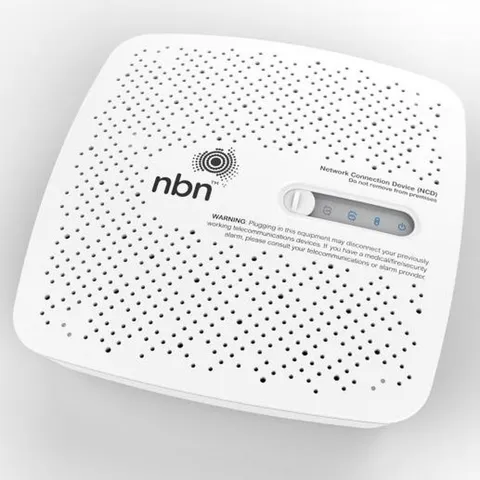
The NCD, also called the nbn connection box, is a small powered unit that stays at your address. It carries your connection and also sends power back down the line to the equipment in the street pit, so it needs its own power plug and stops working in a blackout. It comes with a power cord and a phone cable. nbn says it's registered to your address, so leave it there if you move.
The nbn connection device (NCD) looks like this
3
How do I set up FTTC, and which modem do I need?
The NCD's phone cable goes into a phone wall socket, and an ethernet cable runs from the NCD to your router's WAN or internet port. Any router with an ethernet WAN port will do. You don't need a VDSL modem, because the NCD handles the copper side. Take any ADSL filter out of the path, since it can stop the connection. Not sure about your router? Send us the make and model and we'll check it.
Phone wall socket connects by Phone cable (RJ11) into the nbn NCD's DSL, then Ethernet cable (RJ45) from the Gateway to Your Wi-Fi router.
There are four: Power, Connection, Broadband (sometimes labelled DSL) and LAN. On a first set-up nbn says to expect solid blue lights within about 15 minutes, and that the device may flash blue for several minutes during a software update. The Connection light shows the NCD is powering the equipment outside, so if it's red, contact us. The LAN light shows your router is connected and flashes while data moves. Give a restart a good 15 to 20 minutes before judging it.
What a healthy nbn connection device (ncd) looks like
5
How fast is FTTC?
FTTC tops out at the 100 Mbps tier. nbn lists that tier on FTTC as 50 to 100 Mbps down, so the real number depends on your line and the evening load, and you'll often get closer to the top than on FTTN. Faster tiers like 500/50 need full fibre or cable. We'll tell you what your address supports before you pay.
Selected FTTC homes and businesses can upgrade to FTTP, but nbn describes eligibility as address by address. You order a qualifying plan on a higher speed tier, which may be faster than the one you have now, and you'll usually need to keep it for a minimum period, often 12 months. A technician then installs the fibre alongside your existing service. The old service stays active until you cancel it, so remember to. We'll check whether your address is on the list.
Check the phone cable between the NCD and the wall socket is firm at both ends and not pinched or kinked, and that the power cord is in and switched on. Try another phone socket if you have one. Turn off the NCD and your router, wait 60 seconds, turn the NCD on first and leave it up to 20 minutes. If the lights still aren't solid blue, nbn says you can hold the reset button for one to two seconds. After that, photograph the lights and send them to us. In a lightning-prone area, nbn notes some NCDs have failed after strikes, so mention any storm.
The NCD stays at the address when people move, because nbn registers it to that property and it won't work anywhere else. Take your router, leave the NCD. If you've mistakenly taken one, nbn lets you post it back free through Australia Post. Moving in and the NCD is missing? Tell us and we'll sort a replacement with nbn. Some FTTC homes can self-install: you plug in the NCD yourself, with no technician visit. We'll tell you which applies to your address.