nbn FTTP explained: fibre to the premises, the box and the ports
5 min read · Updated Nov 2026
FTTP is full fibre all the way into your home. Here's how to spot it, which port on the nbn box to use, what modem you need, which speeds it can run, and what happens in a blackout.
1
What is FTTP?
FTTP stands for Fibre to the Premises. A fibre optic cable runs from nbn's network straight into your home, with no copper anywhere in the path. nbn fits a small utility box outside, usually near the front of the property, and a connection box inside. It can run every nbn speed tier, and it tends to be steadier than the copper types because there is no copper to degrade the signal.
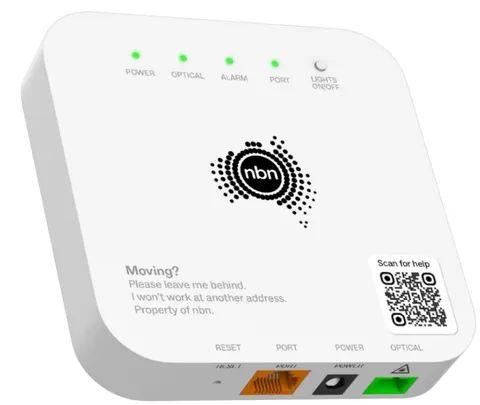
Look for a white nbn connection box on an inside wall, with a thin fibre lead going into it and a light marked Optical. There's no phone socket involved and no coax outlet. A box next to a TV-style coax socket is HFC instead. Not sure? Send us your address and we'll check what nbn says is at your place.
Most homes get the one-port box. nbn fits the four-port model where a property needs several FTTP services, which is more common for businesses. Either way, the port that carries your internet is labelled UNI-D. On a four-port box your service is set up on one specific port, so plugging your router into the wrong one gives you no internet. We'll tell you which port yours uses. A green or flashing light on that port means the router is connected and passing traffic.
Fibre wall outlet connects by Fibre lead — don’t kink it into the nbn connection box's Optical, then Ethernet cable (RJ45) from the UNI-D 1 to Your Wi-Fi router.
4
What modem or router do I need for FTTP?
Any router with an ethernet WAN (internet) port. There's no VDSL on FTTP, so a VDSL modem isn't needed, and an old VDSL-only modem won't work. Use a decent ethernet cable between the box and the router's WAN port. nbn suggests thinking about a replacement if your router is more than five years old, and aiming for at least Wi-Fi 6. If you're on a plan near 1000 Mbps or above, check the WAN port itself is gigabit or better. Send us your router's make and model and we'll check it.
nbn's residential fibre tiers now run from 25/10 up to Home Hyperfast at 2000 Mbps down and 200 up. In between are 50/20, 500/50, 750/50 and Ultrafast at around 1000 down and 100 up. Providers choose which tiers to sell. We sell 25/10, 50/20 and 500/50 on FTTP; ask us if you want to know about the faster ones. Real speeds depend on your router, your Wi-Fi and how busy the network is in the evening.
The nbn box needs mains power, so your internet and any phone service on it stop in a blackout. Your router needs power too. nbn says a provider can supply a battery backup as part of the box's power supply, and that it lasts roughly five hours. Each mains-powered item needs its own battery, and a landline handset has to be a corded phone that doesn't need mains power. If anyone at home relies on a medical or monitored alarm, check with the alarm provider that it works over nbn, and keep a charged mobile handy.
7
FTTP dropping out? Check these first
No lights at all? Check the box's Lights On/Off switch before assuming it's dead, because a switched-off panel looks the same. Power should be solid green and Optical solid green. The Alarm light should stay dark, so if it's lit, photograph the box and send it to us. Look over the thin fibre lead: don't unplug it, bend it sharply or pull on it, because the glass inside damages easily. To restart, switch off the box and your router, wait 60 seconds, then turn the box on first and the router a couple of minutes later.
The nbn box belongs to nbn and stays at the address when people move. It's set up for that property, so take your router with you but leave the box. If the utility box is outside but there's no connection box inside, the home isn't connected yet. You'll need an order and an nbn technician visit, with an adult home for the whole appointment and your landlord's permission if you rent. Tell us your address and we'll check what's already in place.