nbn HFC explained: the connection box, wall socket and speeds
6 min read · Updated Oct 2026
HFC (Hybrid Fibre Coaxial) brings nbn to your home over the old pay-TV cable. Here's what the HFC box and wall socket are, what the lights mean, which modem you need, and how fast it can go.
1
What is nbn HFC?
HFC stands for Hybrid Fibre Coaxial. Fibre runs from the exchange to a node in your area, and from there the coaxial cable originally laid for pay TV carries the signal the last stretch into your home. nbn uses it where that cable network already reached the street, which is mostly suburbs of the big capital cities. It's a fixed-line connection, so it isn't affected by weather or distance to a tower the way wireless is.
Every HFC home has an nbn connection box (sometimes called the HFC modem or NTD) where the cable enters the house. It belongs to nbn, it needs mains power, and it has no battery, so it switches off in a blackout. Your own Wi-Fi router plugs into it with an ethernet cable. Leave the box behind when you move. It's set up for that address only and won't work anywhere else. Boxes installed from February 2025 have a faster 2.5 gigabit port, ready for the top speed tiers.
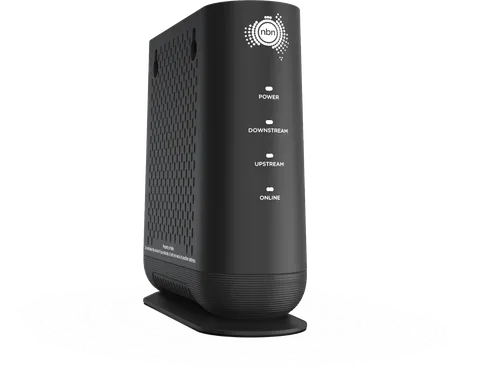
The nbn connection box (HFC) looks like this
3
Which wall socket does HFC use?
HFC uses a coaxial wall outlet, the round TV-style socket, not a phone socket. On older boxes a coax cable screws onto the wall point and the box, and it should be finger-tight with no tools. Newer boxes use a fixed white cable with a lock at both ends. nbn asks you not to unplug it; if you have to (for painting, say), a paperclip in the lock's hole releases it. A loose or damaged coax connection is the most common HFC fault we see.
Connecting the HFC box: older boxes use a screw-on coax cable, newer ones a white cable that locks in place
4
What do the HFC box lights mean?
There are four lights on the front. Power should be solid green. Downstream and Upstream flash while the box searches for the network, which is normal for up to 20 minutes after it's switched on, then go solid. Online solid green means you're connected. If Downstream and Upstream flash while Online stays on, the box is updating its software, so leave it alone. A small Link light on the back shows your router's cable: green is good, off means a bad cable, and yellow means an older cable that's slowing you down.
What a healthy nbn connection box (hfc) looks like
No. The nbn box does the cable part, so you only need a Wi-Fi router with a WAN (internet) ethernet port. Most modern routers work. You don't need a DOCSIS cable modem of your own. Use a CAT5e or CAT6 ethernet cable between the box and the router; an old cable can cap you at 100 Mbps even on a faster plan. On a 1000 Mbps plan or above, check your router's WAN port can keep up.
Coax wall point connects by Coax cable into the nbn connection box's Cable, then Ethernet cable (RJ45) from the UNI-D 1 to Your Wi-Fi router.
HFC is one of the two nbn types that support the fast speed tiers: 500/50, 750/50 and 1000 Mbps plans, and on the newer box the Hyperfast tier. Copper types (FTTN, FTTB, FTTC) top out at 100/40. What you actually get depends on your plan and your Wi-Fi, and on how busy the local cable gets at night. If your speed drops a lot in the evenings, tell us. We'll test the line and take it up with nbn if it's their end.
Order an nbn plan and your provider confirms the install type. Some HFC homes can self-install: the box and cable arrive by post and you plug them in. Others need an nbn-approved installer to visit, usually when there's no working coax outlet yet. Moving into a place with HFC but the box is missing? Tell us and we'll arrange a replacement with nbn.
8
HFC down? Check these first
Make sure the box has power. Check the coax or white cable is firmly connected at the wall and the box. Turn the box and your router off at the power point, wait 60 seconds, turn the box on first, and give it up to 20 minutes before touching anything. If Online still won't go solid, photograph the lights and send them to us. The photo usually tells us exactly what's wrong and can save you a technician visit.