nbn Fixed Wireless explained: the roof antenna, indoor box and speeds
5 min read · Updated Nov 2026
Fixed Wireless is how nbn reaches many regional and rural homes: a roof antenna talks to a nearby tower, and an indoor box feeds your modem. Here's how to spot it, what modem it needs, the current speed tiers, what slows it down, and when 5G or Starlink may suit you better.
1
What is nbn Fixed Wireless?
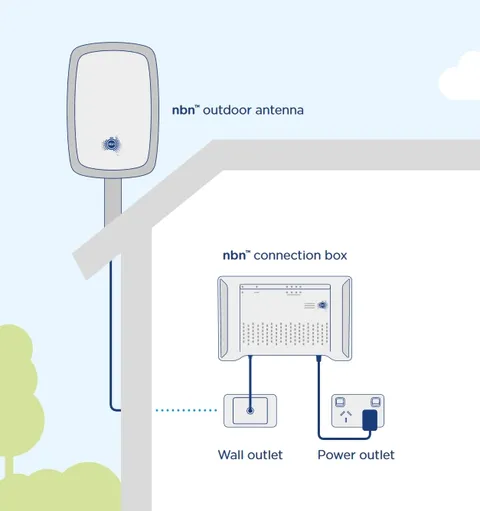
Fixed Wireless sends your internet over radio signals instead of a cable in the ground. An nbn tower transmits to an outdoor antenna on your property, and a cable runs from the antenna to an nbn box inside. nbn says the network reaches around 800,000 premises and has been upgraded with a $750 million investment, using dedicated hybrid 4G/5G technology. It mostly serves regional and rural areas, where running fibre or copper to every home costs too much.
Look up at your roof. If you can see an nbn outdoor antenna, usually on the roof but sometimes under the eaves or on a wall, you're on Fixed Wireless. Inside, there will be an nbn connection box with a cable coming in from the antenna. Not sure? Send us your address and we'll check what nbn has at your place.
The nbn connection box (indoor unit) looks like this
3
What modem do I need?
Any router with an ethernet WAN port. It plugs into a data port (UNI-D) on the nbn connection box with an ethernet cable. There's no phone line involved, so a VDSL-only modem won't work. The nbn box and the antenna cable are nbn's equipment: leave them alone and don't open the tamper-proof cover on the antenna cable.
Roof antenna connects by Antenna cable into the nbn connection box's ODU, then Ethernet cable (RJ45) from the UNI-D 1 to Your Wi-Fi router.
nbn's current Fixed Wireless wholesale tiers are Basic I (12 Mbps down), Basic II (25), Plus (up to 100), Home Fast (up to 250) and Superfast (up to 400). Home Fast and Superfast are only available at eligible premises in upgraded areas, and some older installs need a new antenna first. Those are potential maximums for providers, not what a speed test will show. nbn's own busy-hour figures are lower, for example up to 187 Mbps on Home Fast and 357 Mbps on Superfast. Your tier depends on your address, so we check it before you order.
Line of sight matters first: the antenna is aimed at the tower, so a tree that has grown or a new shed in the way weakens the signal. Then tower load: everyone on the same tower shares it, and evenings from 7pm to 11pm are busiest. Weather comes last: heavy rain and storms can dent a wireless link. Inside the house, an old router or a poor Wi-Fi spot can look like a Fixed Wireless problem too, so test with a cable plugged straight into the router.
Lift the cover on the nbn connection box to see the lights. Power should be green. The ODU light, which reports the link to your antenna, should be steady or blinking green. Status should be blinking green. Some boxes also show a signal light, which should be green too. Red or flashing lights that don't clear, or lights that keep resetting over about a minute, mean a fault to report. Write down each light's colour and whether it's steady or blinking, or take a photo.
What a healthy nbn connection box (indoor unit) looks like
First check the nbn box is plugged straight into a working power point and switched on. Then look at the antenna from the ground for anything obvious, such as a branch that has fallen on it or knocked it out of line. Turn the nbn box and your router off for 60 seconds, then turn the nbn box on first and the router a few minutes later. Don't paint or cover the antenna, and keep branches away from it. If you plan building work or a new shed, tell us first, because the antenna may need moving.
8
When would 5G or Starlink suit me better?
If your Fixed Wireless is slow in the evenings or struggles in bad weather, other options may do better. 4G/5G home internet works well when you have strong mobile coverage, and it's quick to set up. Starlink suits properties with a clear view of the sky and little or no mobile signal. Both depend on exactly where you are, so we check coverage at your address first.